



This has been another educational phishing campaign from the ULM Office of Information Technology. You are here because you clicked the link in the phishing campaign email you received.
Whenever you enter your ULM credentials into a hacker's login screen, the hacker can then access your ULM account. Take this opportunity to learn how to protect yourself. There were clues in the email.
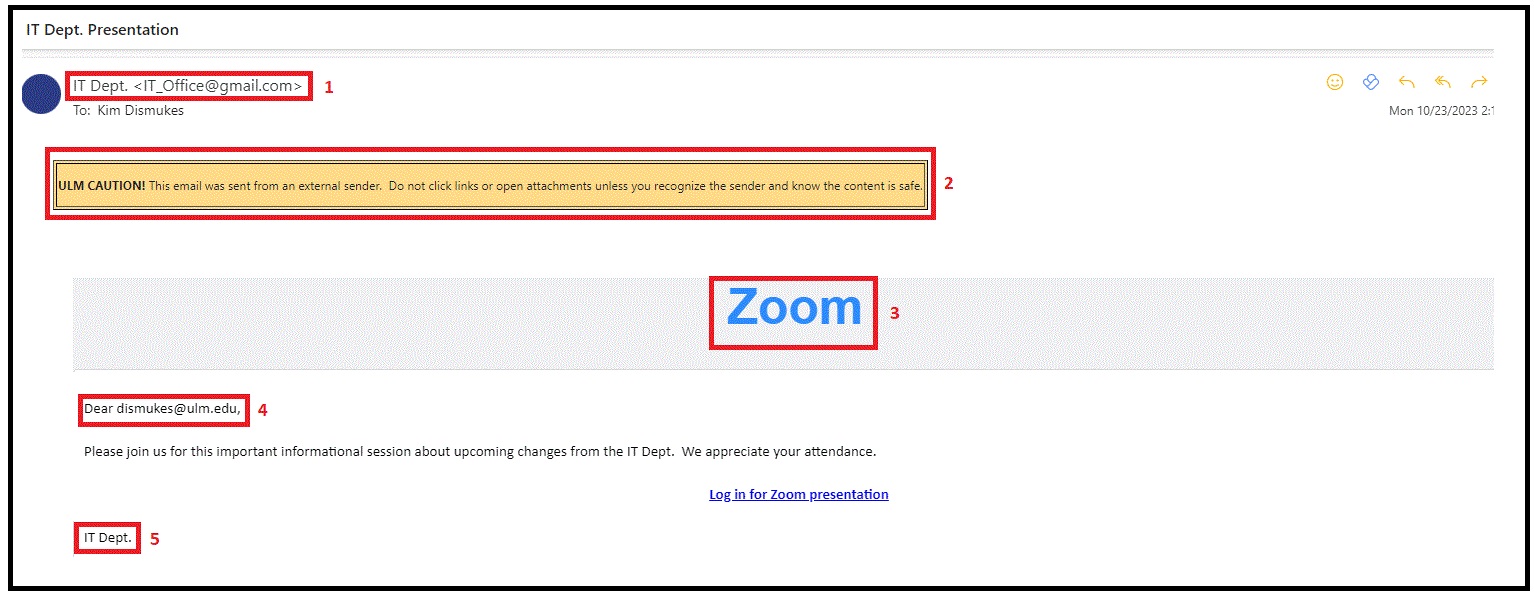
1. Sender display name and email address: Sender's display name and email address sound as if they could be correct, but neither corresponds to a legitimate ULM department or email address.
2. Logo imitation or dated branding: ULM banner indicating email is from an external sender is present.
3. Spoof or imitation of logos: There is no Zoom logo, just the word "Zoom".
4. Spelling and grammar irregularities: The greeting has the user's email address instead of their name.
5. Incorrect signature: The signature on the email is not the normal signature block of the ULM Office of Information Technology that includes our phone number, ULM email address, and the street address of the University.
- ULM OFFICE OF INFORMATION TECHNOLOGY